by casdesigns01 | Nov 4, 2020 | Organic Blog
A visual sitemap generator is a tool that provides a visual representation of a website structure, showing the connection between pages and content. Web designers and developers use these tools to plan their website creation and overhaul process while also communicating ideas to the relevant stakeholders.
There are many visual sitemap generators on the web today, but all of them are not created equal. We sought to find out the best ones available based on features and their ability to handle sites of all sizes. After thorough research and testing, we settled on three of them, namely WriteMaps, DynoMapper, and PowerMapper.
WriteMaps
With WriteMaps, having an idea is your greatest asset. If you remotely know what your website should look like, this tool will help you create a visual sitemap in just a few clicks.
WriteMaps uses color-coded flowcharts to add a unique taste to the content provided in every page of your site. Use it to add new pages and edit old ones, re-order pages and sections, and change colors as you wish.
What we like the most about this tool is it allows for easy collaboration. For example, you can share your content via a unique URL and enable guest editing. This way, other stakeholders can share their ideas in real-time for faster completion of projects.
You can sign up for a new account on WriteMaps with a 15-day free trial. Take advantage of this period to test its features and decide whether to go ahead with it or look elsewhere. Thereafter, you can choose from one of its two monthly plans of $14.99 and $29.99 respectively.
DynoMapper
Dynomapper is a visual sitemap generator that comes with an extension for Google Analytics, thereby enabling you to analyze the performance of your webpages. Some of the tool’s notable features include content inventory, content audit, website accessibility testing, content planning, and keyword tracking. Use the tool to create, edit, and personalize the hierarchy and placement of different web pages.
As for plans and pricing, DynoMapper offers a free trial covering up to 100 pages and one project. If this is not enough, you can upgrade to its Standard, Organization, or Plus plans whose monthly pricing ranges from $49, $199, and $299 respectively.
PowerMapper
Up until recently, PowerMapper used to be one of the very few tools available for designers to create visual sitemaps. This partly explains its huge command of the market despite the introduction of other generators.
Another reason you might want to check it out is because of its one-click web dev tools that check broken links, spelling errors, compatibility, web standards, SEO, and usability. We also like that PowerMapper has its independent browser to enable you navigate your website as you continue planning it.
The tool’s lowest monthly plan will set you back $49 for the single-user license.
Conclusion
Visual sitemaps are a vital part of any successful website design and content planning. Use any of these three grade-A generators to create intuitive sitemaps that also enable you to collaborate with others in your projects.

by casdesigns01 | Oct 28, 2020 | Organic Blog
There’’ s gold in them thar SERPs … gold I inform ya!
Now, whether that expression takes you back to an easier (possibly? I put on’’ t understand, I was born in the 80s) time of gold panning, Mark Twain, and metallurgical assay —– or simply makes you desire some Velveeta shells and liquid gold (I likewise may be starving) —– the point is, there is a lot you can gain from evaluating search engine result.
Search engine outcomes pages (SERPs) are the mountains we’’ re attempting to climb up as SEOs to reach the peak( primary position). These mountains aren’’ t simply for climbing up– there are many ““ nuggets ” of info to be mined from the SERPs that can assist us on our journey to the mountaintop.

Earning page one rankings is challenging —– to develop enhanced pages that can rank, you require extensive SEO technique that consists of:
.Material auditsKeyword researchCompetitive analysisTechnical SEO auditsProjections and forecastingNiche and audience researchContent ideation and creationKnowledge and an understanding of your (or your customer’’ s )site ’ s history And more.
A lots of work and research study enters into effective SEO.
Fortunately, much of this details can be obtained from the SERPs you’’ re targeting, that will in turn notify your technique and assist you make much better choices.
The 3 primary locations of research study that SERP analysis can benefit are:
.Keyword researchContent creationAnd competitive analysis.
So, get your pickaxe helpful (or perhaps simply a note pad?) since we’’ re going to find out how to mine the SERPs for SEO gold!
. Discovering keyword research study nuggets.
Any sound SEO method is constructed on sound keyword research study . Without keyword research study, you’’ re simply blindly hoping and developing pages Google ranks them. While we put on’’ t completely understand every signal or comprehend in Google’’ s search algorithm– I ’ m quite positive your ““ hopes ” aren ’ t among them– you require keyword research study to comprehend the chances as they exist.
. 
And you can discover some huge nuggets of details right in the search results page!
.
First off, SERP analysis will assist you comprehend the intent( or a minimum of the viewed intent by Google) behind your target keywords or expressions. Do you see item pages or educational material? Exist contrast or listicle type pages? Exists a range of pages serving several possible intents? :
. 
Examining these pages will inform you which page– either on your website or yet to be produced– would be a great fit. If the outcomes are long-form guides, you ’ re not going to be able to make your item page rank there (unless of course the SERP serves several intents, consisting of transactional ). You must evaluate search intent prior to you begin enhancing for keywords, and there ’ s no much better resource for determining searcher intent than the search results page themselves.
.
You can likewise discover a lot about’the possible traffic you might get from ranking in a provided SERP by evaluating its makeup and the capacity for clicks.
.
Of course, all of us wish to rank in position primary( and in some cases, position absolutely no )as standard knowledge indicate this being our finest opportunity to make that important click-through. And, a current research study by SISTRIX validated as much, reporting that position one has a typical click-through rate( CTR) of 28.5%– which is relatively bigger than positions 2( 15.7%) and 3 (11 %).
.
But the most fascinating data within the research study were relating to how SERP design can affect CTR.
.
Some highlights from the research study consist of:
. SERPs that consist of sitelinks have a 12.7% boost in CTR, above average.Position one in a SERP with a highlighted bit has a5.2% lower CTR than average.Position one in SERPs that include an understanding panel see an 11.8% dip in CTR, listed below average.SERPs with Google Shopping advertisements have the worst CTR: 14.8 %below par.
SISTRIX discovered that general, the more SERP components present, the lower the CTR for the leading natural position.
.
This is important details to find throughout keyword research study, especially if you ’ re looking for chances that may bring natural traffic reasonably rapidly. For these chances, you ’ ll wish to research study less competitive keywords and expressions, as the SISTRIX report recommends that these long-tail terms have a bigger percentage of “ simply natural SERPs( e.g. 10 blue links).
.
To see this in action, let ’ s compare 2 SERPs: “ gold panning devices ” and “ can I utilize a sluice box in California? ”.
Here is the top of the SERP for “ gold panning devices ”:
. ![]()
And here is the top of the SERP for “ can I utilize a sluice box in California? ”:
. 
Based on what we understand now, we can rapidly evaluate that our possible CTR for “ can I utilize a sluice box in California? ” will be greater. Included bits lower CTR for other outcomes, there is the possibility to rank in the bit, and the ““ gold panning devices ” SERP functions going shopping advertisements which have the most unfavorable effect( -14.8 %) on CTR.
.
Of course, CTR isn ’ t the “only determining element” in just how much traffic you ’d possibly get from ranking, as search volume likewise contributes. Our example “ can I utilize a sluice box in California? ” has little to no search volume, so while the chance for click-throughs is high, there aren ’ t lots of browsing this term and ranking wouldn ’ t bring much natural traffic– however if you ’ re an organization that offers sluice boxes in California, this is definitely a SERP where you ought to rank.
.
Keyword research study sets the phase for any SEO project, and by mining existing SERPs,’you can get info that will assist the execution of your research study.
. Mining material production nuggets.
Of course, keyword research study is just beneficial if you take advantage of it to produce the best material. We can discover huge, flashing nuggets of material production gold in the SERPs, too!
.
One the primary littles info from analyzing SERPs is which kinds of material are ranking– and because you wish to rank there, too, this info works for your own page development.

For example, if the SERP has a highlighted bit, you understand that Google wishes to respond to the inquiry in a fast, concise way for searchers– do this on your page. Video results appearing on the SERP? If you want desire rank there too, you need to most likely consist of a video on yourpage. Image carousel at the top? Consider what images may be connected with your page and how they would be shown.
.
You can likewise evaluate the ranking pages to get insight into what formats are carrying out well because SERP. Are the ranking pages mainly guides? Contrast posts? Forums or frequently asked questions? News interviews or short articles? Infographics? You ’ ve currentlygot a good great concept how you should must( or re-structure) your page if you can recognize a pattern in format.
.
Some SERPs might serve numerous intents and show a mix of the above kinds of pages. In these circumstances, think about which intent you desire your page to focus and serve on the ranking page that serves that intent’to obtain material production concepts.
.
Furthermore, you can take advantage of the SERP for subject ideation– beginning with individuals Also Ask (PAA )box. You ought to currently have your main subject( the primary keyword you ’ re targeting), however the PAA can supply insight into associated subjects.
.
Here ’ s an example of a SERP for “ modern-day gold mining strategies ”:
. 
Right there in the PAA box, I ’ ve got 3 strong concepts for sub-topics or areas of my page on “ Modern Gold Mining ”. These PAA boxes broaden, too, and”offer more possible sub-topics.
.
While comprehensive keyword research study need to discover most long-tail keywords and expressions associated with your target keyword, evaluating individuals Also Ask box will guarantee you sanctuary ’ t missed out on anything.
.
Of course, comprehending what kinds of formats, structures,”subjects, and so on carry out well in a provided SERP just gets you part of the method there.You still require to produce something that is much better than the pages presently ranking. And this brings us to the 3rd kind of knowledge nuggets you can mine from the SERPs– competitive analysis gold.’
. Drawing out competitive analysis nuggets.
With an understanding of the keywords and content types related to your target SERP, you ’ re well on your method to staking your claim on the very first page. Now it ’ s time to examine the competitors.
.
A fast look at the SERP will rapidly offer you a concept of competitors level and possible keyword problem.Take a look at the domains you see– exist identifiable brand names? As a brand-new or little e-commerce website, you’can rapidly throw out any keywords that have actually SERPs cluttered with pages from Amazon, eBay, and Wal-Mart. Alternatively, if you see your direct rivals ranking and no big brand names, you ’ ve most likely discovered an excellent keyword set to target. Naturally, you might — encounter SERPs that have significant brand names ranking in addition to your rival– if your rival is ranking there, it suggests you take a crack at, too!
.
But this is simply the surface area SERP silt( state that 5 times quickly). You require to mine a bit much deeper to reach the huge, golden competitive nuggets.
. 
The next action is to click through to the pages and examine them based upon a range of elements, consisting of (in no specific order):
. Page speed Visual aestheticsTimeliness and recencyReadability and structureAmount and quality of citationsDepth of protection of associated topicHow well the page matches search intent.
If the page is doing not have in any, lots of, or all these locations, there is a strong chance your page can end up being the much better outcome, and rank.
.
You must likewise evaluate the number of backlinks ranking pages have, to get a concept for the variety of links you require to reach to be competitive. In addition, evaluate the variety of referring domains for each ranking domain– while you ’ re completing on a page-to-page level in the SERP, there ’ s no doubt that pages on more reliable domains will take advantage of that authority.
However, if you discover a page that ’ s ranking from a brand-new or reasonably unidentified website, and it has a considerable quantity of backlinks, that ’ s most likely why it ’ s ranking, and making a comparable quantity of links will provide your page a great possibility to rank.
.
Lastly, make the effort to dive into your rival ’ s ranking pages (if they ’ re there). Analyze their messaging and research study how they’’ re speaking with your shared audience to recognize locations where your copy is suboptimal or totally’fizzling.’Keep in mind, these pages are ranking on page one, so they need to be resonating in some method.
. Conclusion.
Successful SEO needs extensive research study and analysis from a range of sources. Much of what you require can be discovered in the really SERPs for which you ’ re attempting to rank. You require to comprehend why the pages that rank are carrying out if you desire yourpages to appear there, too.
.
These SERPs have lots of practical takeaways in regards to:
. Keyword research study and analysisContent ideation and strategyAnd competitive analysis and evaluation.
These golden nuggets are simply there for the takin ’ and you put on ’ t require any tools besides Google and your analytical mind– well, and your metaphorical pickaxe.
.
.
Sign up for The Moz Top 10 , a semimonthly mailer upgrading you on the leading 10 most popular pieces of SEO news, pointers, and rad links revealed by the Moz group.Think about it as your unique absorb of things you do not have time to hound however wish to check out!
.
Posted by AndrewDennis33

Read more: feedpress.me
by casdesigns01 | Oct 16, 2020 | Organic Blog
What if I informed you there was a method to reach an audience bigger than the one Netflix has through YouTube analytics?
It’’ s possible!
YouTube videos reach more than 2 billion users a month —– about one-third of the whole web’’ s traffic.
.
However, if you wish to utilize YouTube videos to drive traffic and profits, you require to deep into the information.
How do you understand whether your video has affected your company?
Through the reliable usage of YouTube analytics !
In the next couple of areas, I’’ ll describe what YouTube analytics is everything about, how to access it, what metrics you require to track, and how to take advantage of this info for much better ROI.
.What Is YouTube Analytics?
YouTube analytics is the native analytics platform on the website, supplying access to crucial metrics about video efficiency consisting of watch time, audience demographics, traffic sources, impressions, and more.
What is the point of all this details?
This information is here to assist you comprehend what kind of material your audience has an interest in so you can enhance your YouTube method.
If you dislike learning information, you’’ ll enjoy to understand YouTube analytics is quite simple.
Instead of frustrating yourself with a lots of details, you can select to concentrate on the information that matters most to your brand name.
.Why Is YouTube Analytics Important?.
Simply put, understanding about your YouTube videos’ ’ efficiency levels is crucial to comprehending how efficient your efforts have actually been. You can produce more of the material your audiences like when you understand that.
.Why does YouTube Analytics matter a lot?
For beginners, YouTube is the 2nd most popular site online . Duration.
Further highlighting YouTube’’ s appeal is that teenagers invest much more time enjoying YouTube than live TELEVISION —– and even Netflix or Hulu.
.If your items appeal to this market, #ppppp> This reality is of specific significance.
But YouTube isn’’ t simply for teenagers– individuals of all demographics and ages see more than a billion hours of YouTube videos every day.
.How to Access YouTube Analytics.
Ready to go into the information? Here’’ s how to gain access to YouTube analytics.
.
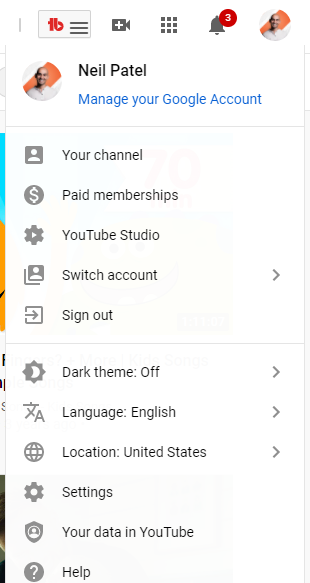
From the YouTube homepage, browse to the leading right corner, where you see your account’’ s avatar.
.
Click on the image, and you ’ ll see a drop-down list of account alternatives.
Select ““ YouTubeStudio. ”
. 
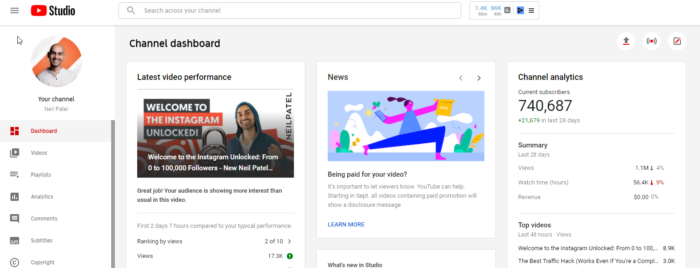
On the next page, you ’ ll see the Studio control panel.
.
There ’ s a sidebar’left wing, which permits you to gain access to various parts of your account.
.
Click “ Analytics, ” which takes you to a summary of your YouTube channel ’ s efficiency.
. 
The summary page supplies information like views, viewtime, customers, approximated income, and real-time reporting.
.
You ’ ll likewise see 4 main analytics tabs:
.ReachEngagementAudienceRevenue 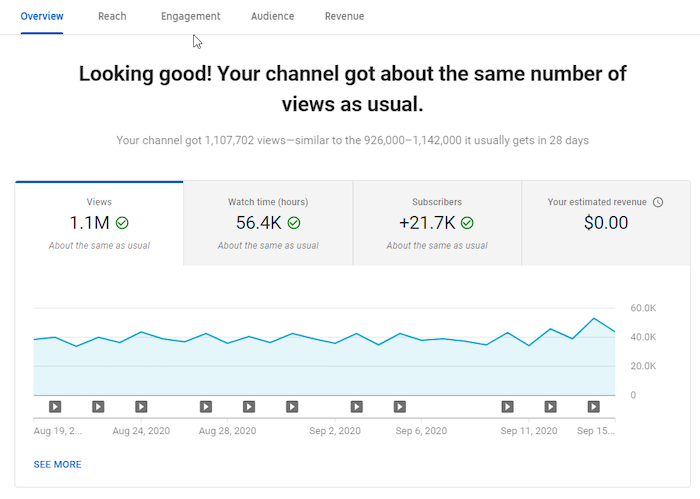
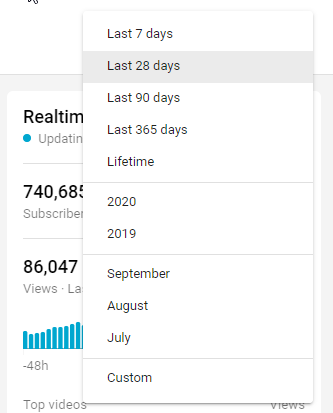
The data you see here are for the last 28 days.That ’ s YouTube ’ s default setting.
.
However, you can see metrics for a various duration by clicking the drop-down on your screen ’ s leading right corner.
. 
What if you wish to see how well your videos have carried out within 60 minutes or 48 hours of striking the release button?
.
The real-time report offers these information.
YouTube knows in location to assist you comprehend the metrics, even if you ’ re a novice.
.
All you need to do is hover over your picked’metric or click the “ i ” in a circle appearing near the metric ’ s” name.
.
Here ’ s an example:
. 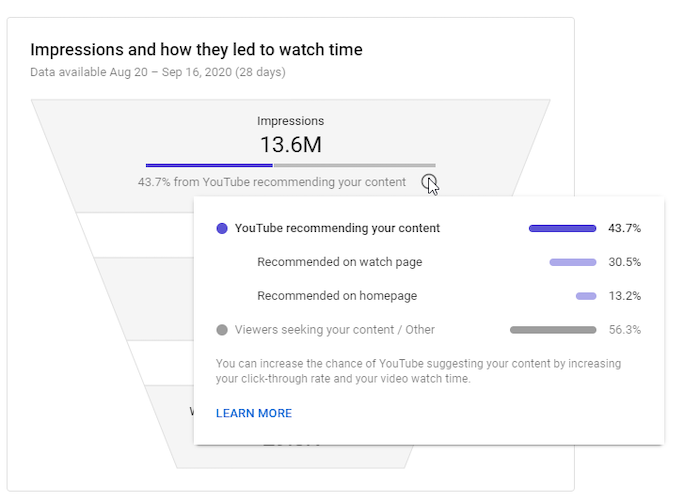
If you wish to comprehend the metrics even more, the “ Learn More ” link at the bottom “of package is available in useful.
.
In addition to total channel metrics, you can likewise see specific videos ’ metrics.
.
To access video metrics, clickany video from the introduction page.
. 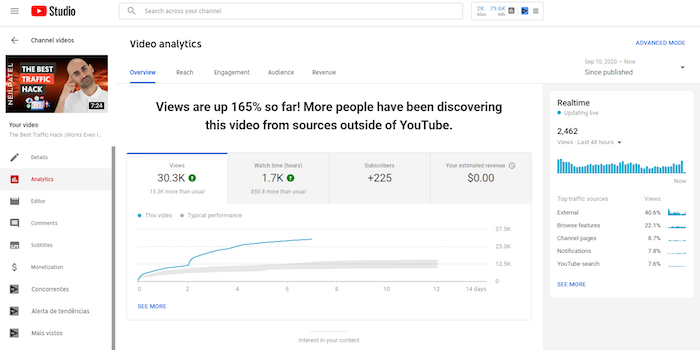
Click on ““ See More ” to dive deeper into the analytics of a particular video.
.
Alternatively, you might click ““ Advanced Mode ” on top right corner.
.
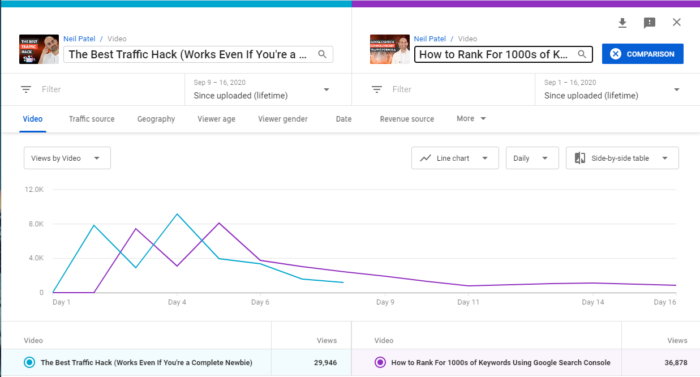
Want to see how 2 videos carried out versus each other?
The contrast function permits you to compare 2 videos, one video versus itself over various durations, or a video with a group of other videos.
If the video becomes part of a series, you can find how it compares to the others.
Additionally, you can find if there is a distinction in seasonal video efficiency.
To access this function, click ““ Compare to ” on top right corner of the page.
. 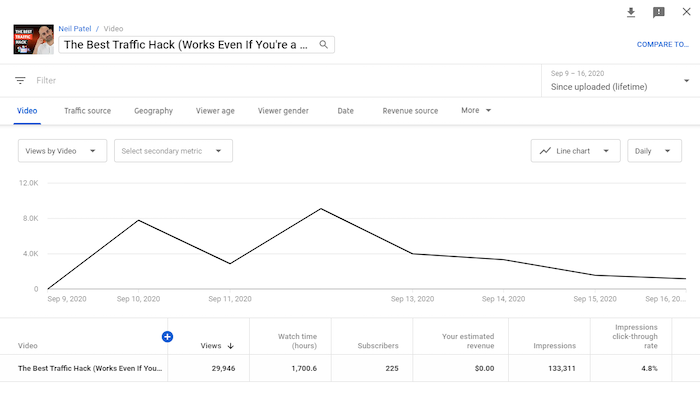
Here, you can choose the durations, video, orgroup to compare.
. 
Another helpful alternative is to include filters toyour metrics.
.
You can discover the filter alternative below the video ’ s title in the upper left, below the image’from your video.
. 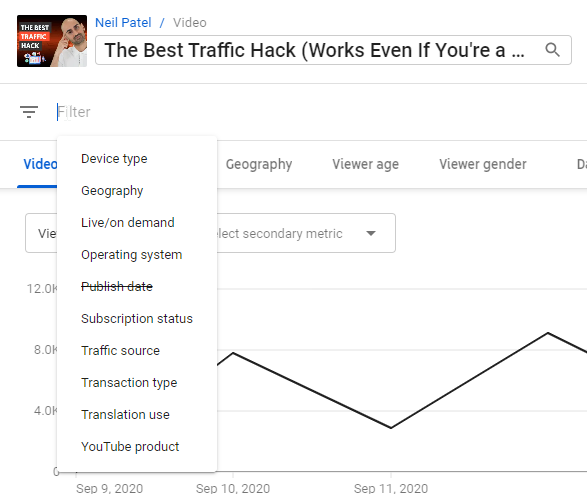
Clicking the “+ ” icon at the “top of the table of metrics raises a huge list of metrics you can have a look at.
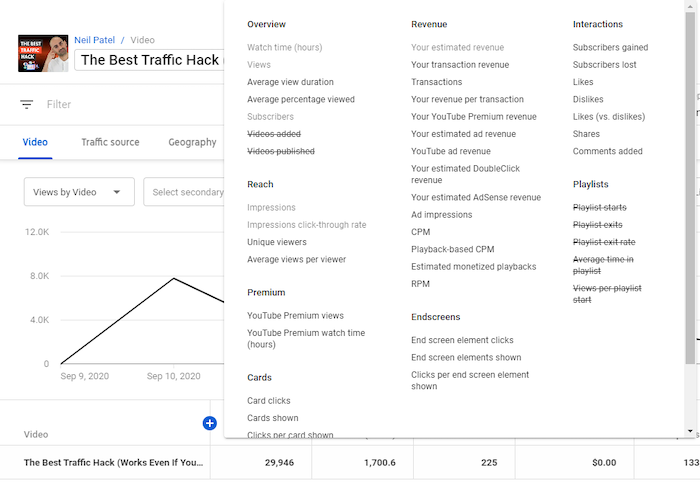
Want to conserve or share your information? You can quickly export it for more analysis.
To do this, browse to the leading right corner of the page you wish to click the download and export icon—– a downward-facing arrow with a line below it.
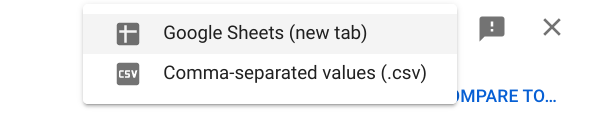
This will raise 2 alternatives—– Google Sheets and.csv—– so you can select the format you choose.
.Important Metrics to Track on YouTube Analytics.
It’’ s simple to get lost in the sea of information on different marketing platforms. There’’ s a lot details, and it’’ s reasonable if you get overwhelmed by all the filters, tools, and choices.
And the exact same uses to YouTube analytics.
Don’’ t concern, though: YouTube analytics is relatively simple to utilize.
Keep in mind you just require to see metrics addressing a particular concern you have.
These concerns may consist of:
.How do audiences engage with our videos?When do they leave the videos?Which videos transform the most audiences to subscribers?Do our YouTube audience demographics match with our purchaser personalities ?
With these and more concerns in mind, it must end up being simpler to see the metrics you require.
Below, I’’ ll share 7 vital metrics in YouTube Analytics and insights you might originate from them.
.1. Demographics.
When developing a video, you require to understand who you’’ re targeting– and who ’ s seeing.
.
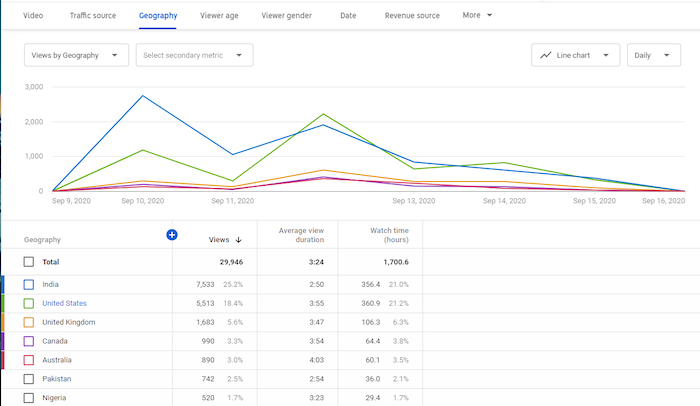
YouTube ’ s demographics information exposes information like the leading nations and cities your audiences are seeing from, audiences’ ’ ages and genders, the times and days they usually view videos, and more.
.Area.
If you have numerous audiences from a specific nation or city, and your brand name permits this, you might customize material to those places. If you’’ re marketing a regional item, however your videos aren’’ t normally being seen in your area, it might be time to examine your keywords.
 Age and Gender.
Knowing who your audience is can assist you develop suitable and pertinent material. You wouldn’’ t desire to produce R-rated material if your audiences are normally 13-17!
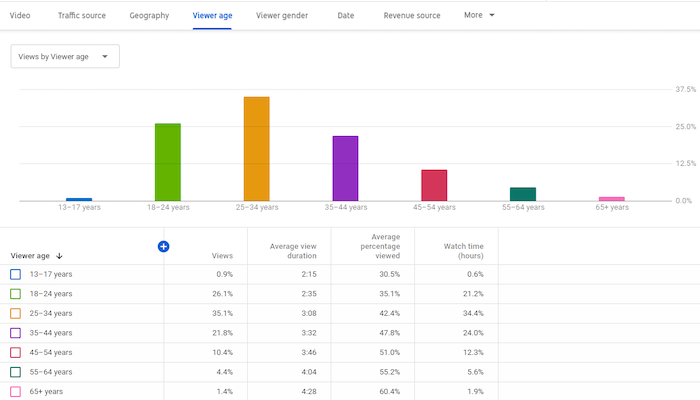
Furthermore, the days and times audiences are on YouTube offers insights into when you must release brand-new videos.
If you run YouTube advertisements , having demographics info can likewise enhance your capability to target content appropriately.
Finally, you can compare your demographics information to your purchaser personality.
Do they match?
If so, terrific! If not, will you alter your purchaser personality or your material?
.2. Traffic Source Types.
Traffic source types suggest where audiences discover your videos, such as YouTube search, Suggested videos, Channel pages, direct sees, views from external sources, and others.
In addition, you’’ ll see how audiences from each source act.
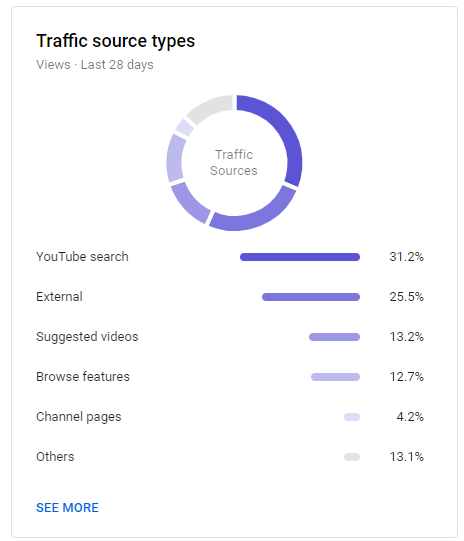
These metrics offer info about the sources accountable for your video views. You may discover your blog site drives a load of traffic to YouTube, which implies you might desire to embed more videos in blog site posts.
For more information about how individuals discovered you, you can click each source. Clicking on ““ YouTube search ” will reveal you what keywords led users to your videos.
.
You can likewise see which sources contributed little to your views and attempt to determine how to enhance those locations.
For example, a low variety of views from YouTube search may indicate you require to enhance your YouTube SEO .
Or, a little number of views from Suggested videos may show you require to engage your audience much better. Greater engagement suggests YouTube might see your videos as important and recommend them to individuals seeing comparable material.
.As soon as you dig into the information, #ppppp> There are even more insights to reveal.
.3. View Time.
Getting a great deal of YouTube views is great, however getting a high watch time is even much better. ““ Watch time ” is for how long users invest seeing your videos.
.
YouTube ’ s algorithm utilizes this metric to assist it comprehend your material ’ s quality. This suggests a long watch time enhances your opportunities of appearing as recommended videos and on search pages.
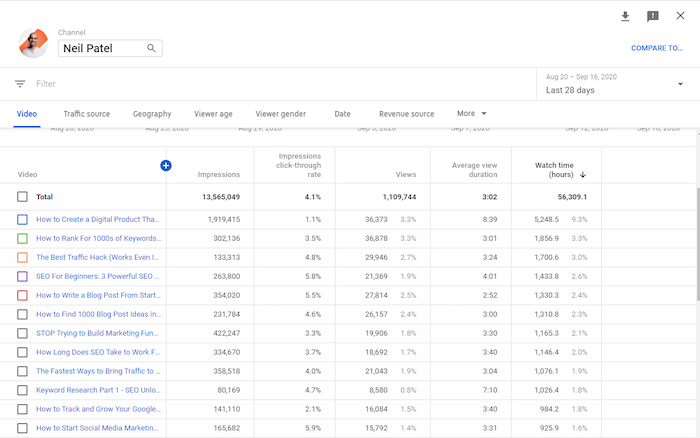
You can evaluate each video’’ s see time and compare it to the video ’ s length.
What kinds of videos have high watch times? What types have low watch times? Why do you believe that is?
Considering the distinctions in between videos with low and high watch times can assist you develop much better material in the future.
You must likewise analyze videos with a high watch time at a specific season. This might be a seasonal video—– and if it succeeded, think about developing a comparable video next year.
.4. Customers.
When an audience clicks the ““ Subscribe ” button, they ’ re validating their interest in your material. They ’ re then most likely to see when you publish brand-new videos—– and view them.
YouTube Analytics shows the variety of customers you’’ ve acquired and lost throughout an offered duration.
You’’ ll likewise see which videos added to your customers count.
Which videos are accountable for a high variety of customers acquired? Which ones are accountable for customers lost?
Analyzing these modifications can assist you enhance the material you develop. If longer videos tend to drive more customers, then you need to focus on longer videos
You can likewise see membership sources, which informs you where customers discovered your material.
There’’ s another method to comprehend what drives customers– comparing them with non-subscribers.
For example, you can compare these 2 audiences on metrics such as watch time, consisting of the time invested seeing and what portion of the video they enjoyed.
Thirty seconds indicates something really various on a 45-second video than it does on a 45-minute video!
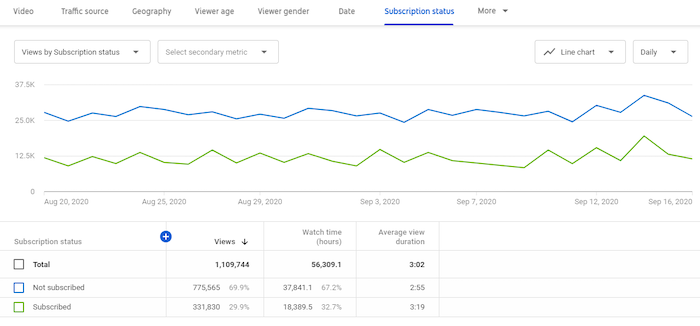
In the image above, there’’ s an abnormality. You see, non-subscribers are surpassing customers substantially. This information shows a requirement for additional examination—– maybe inspect their traffic sources.
.5. Leading Videos By End Screen.
If you’’ ve ever seen YouTube, you understand numerous videos end with pictures of other videos to view. Those images exist to attract users to keep viewing.

The metric associated to this informs you which end screens represented the most clicks.
By clicking ““ See More ” in the engagement tab, you ’ ll see information such as end screen components revealed, end screen component clicks, and clicks per end screen aspect.
As an outcome, you can determine videos that keep audiences viewing.
Why is a particular end screen more efficient than another? Use the insights to other videos as soon as you figure this out.
.6. Leading Cards.
Card components are interactive and permit you to promote other YouTube links or videos to your site. You can see an example in the image below—– the ““ Suggested ” bar is a card aspect.
Card aspect metrics reveal you information such as card clicks, cards revealed, clicks per card, and more.
From these numbers, you’’ ll find which cards were most reliable at transforming audiences.
Ask these concerns:
.What makes these cards effective?Are cards more reliable on some videos than others?At what time are cards most efficient in a video?What makes some card teasers efficient?
By diving deeper into these metrics, you can discover responses to these crucial concerns.
.7. Income.
YouTube advertisements are vital to earnings. To run YouTube advertisements, you require at least 1,000 customers and 4,000 hours of watch time. Concentrate on making terrific material utilizing your metrics as a guide to get to these numbers.
You can see an example of an advertisement overlaying a YouTube video listed below.

If you’’ re running advertisements as part of the YouTube Partners Program currently—– or when you get to that point—– the income area of analytics is important.
Here, you’’ ll discover information such as your earnings sources, top-earning videos, advertisement types, regular monthly approximated profits, YouTube Premium income, and more.
What are the top-earning videos? How are they various from the low earners?
You might get the answer to these concerns and more by diving deeply into profits analytics.
All that stated, you put on’’ t need to monetize your channel through advertisements—– I put on’’ t do this myself. Rather, I utilize YouTube for branding, education, and to drive traffic to other resources.
.Other YouTube Analytics Tools.
YouTube analytics supplies a lots of metrics about your channel efficiency, however it’’ s not the only source of information offered.
That’’ s why you need to utilize other analytics tools to acquire more insight into your YouTube projects.
Using these tools, you can get analytics for other channels in your market, boost YouTube SEO, and get suggestions to enhance.
Here are 3 other tools to much better comprehend your YouTube video efficiency.
.Vidooly.
Using your YouTube analytics info, Vidooly supplies recommendations about how to enhance your videos.
They likewise give access to video tag analysis—– implying the words in your video’’ s metadata– so you can find high-performing tags.
To assist you rank greater in YouTube keyword searches, Vidooly likewise has a keyword tool that might improve your videos’ ’ SEO
.
If you run influencer marketing projects , Vidooly can assist you determine which influencers might assist grow your channel.
. ChannelMeter.
ChannelMeter supplies access to exceptionally comprehensive audience insights.
.
Beyond that, you can keep track of how videos from influencers carry out. This comes in handy if you run YouTube influencer marketing projects– or if you wish to imitate a few of their concepts.
.
ChannelMeter likewise enables you to examine your standards and follow patterns amongst comparable videos so you can adjust appropriately.
. Unmetric.
One of Unmetric ’ s most substantial functions is the benchmarking tools. These tools enable you to compare your technique versus your rivals.
.
For’example, you can take a look at your rival ’ s click-through rate, engagement rate, and video conclusions. This tool can assist you establish project objectives and recognize brand-new patterns.
.
Furthermore, you can see how you fare versus your rivals and get insights that might increase your projects. They even offer concepts for material development.
. Conclusion.
YouTube Analytics is vital to running any effective YouTube project.
.
You can learn more about your audience, what you ’ re succeeding, and where you can enhance– without being slowed down by unneeded information, thanksto YouTube Analytics ’ valuable filters.
.
What elements of your videos do you believe YouTube analytics can enhance?
.
The post How to Optimize Your Videos Through YouTube Analytics Data appeared initially on Neil Patel .
. 


Read more: feedproxy.google.com